How to open Guitar Pro files on Android
You downloaded a tab ending in .gp5, .gpx or .gp, tapped it, and your phone said it can't open it. Here's the fix.
Short answer: Android has no built-in app for Guitar Pro files. Install an app that reads them, then tap the file and choose that app from the Open with list. Fretly, our app, does this for free and works offline.
Step by step
- Install a Guitar Pro reader. Fretly on Google Play is free. The official Guitar Pro mobile app also opens these files if you already own it.
- Find the file. Open your file manager (often called Files or My Files) and go to Downloads. You can also tap the finished download in your browser.
- Tap the file and choose Fretly. If Android asks, pick Always so
.gp5and.gpxfiles open straight away next time. - Hit play. The tab scrolls and every note lights up on a fretboard under it, so you can see where your fingers go.
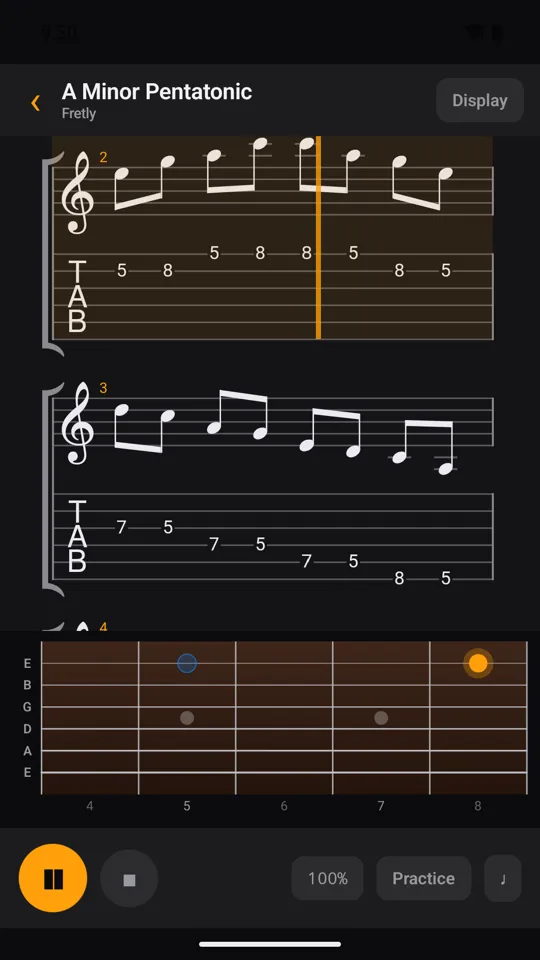
This is what you get once the file is open: standard notation and tab on top, a live fretboard underneath.
Amber is the note playing now.
Blue is the next one, so your hand can get there early.
Drum tracks show a drum kit and keyboard tracks show a keyboard, and you can mute or solo any track.
If it still won't open
Fretly isn't in the "Open with" list
Some file managers don't offer apps for file types they don't recognise. Open Fretly instead, tap Import in the library, and pick the file from Downloads. That always works.
The download ended up as .gp.zip
A Guitar Pro 7/8 .gp file is technically a zip archive, so some browsers save it as song.gp.zip. Don't unzip it. Open Fretly, tap Import, and pick the .gp.zip file as it is. Fretly checks what's inside the file rather than trusting its name.
The file opens but looks empty or broken
Check the file really is a Guitar Pro file. Some sites hand out a web page or a .zip with a .gp5 inside. Unzip it first, then import the file inside.
It's a .gtp or .ptb file
.gtp is a very old Guitar Pro format and .ptb is Power Tab, a different program. Fretly doesn't read either. Convert them to .gp5 on a computer first, for example with the free desktop program TuxGuitar.
The file comes from Guitar Pro's own content store
Files bought inside Guitar Pro's own store are locked to the Guitar Pro app. No other app can open them, Fretly included.
Which formats work
| Extension | What it is | Fretly |
|---|---|---|
.gp | Guitar Pro 7 and 8 | Yes |
.gpx | Guitar Pro 6 | Yes |
.gp5 | Guitar Pro 5 | Yes |
.gp4, .gp3 | Guitar Pro 4 and 3 | Yes |
.musicxml, .mxl, .xml | MusicXML, exported by MuseScore and most notation apps | Yes |
.gtp | Guitar Pro 1 and 2 | No |
.ptb | Power Tab | No |
Common questions
Do I need an account or internet?
No. Fretly reads files straight from your phone, works fully offline, and has no sign-up.
Is it really free?
Opening and playing your files, the fretboard, track mute/solo, the tuner and the metronome are free on every song. The free version shows a short ad when you open your own songs. Fretly Pro is a single payment, not a subscription. It adds slow-down, looping, wait mode and a tempo trainer for your own songs, and removes ads.
Does Fretly come with songs?
It comes with built-in exercises, but it doesn't host or share tabs of other people's songs. You open files you already have.
What about iPhone?
Fretly is Android-only for now.

Written by the developer of Fretly, so this guide is not neutral. Corrections welcome at oktapsj1804@gmail.com.